Know your stock. Before your customer asks.
Every sale and purchase updates inventory, so the screen always matches the shelf.
Products 116 active
| Product | In stock | Status |
|---|---|---|
| House blend coffee | 48 | In stock |
| Green tea | 36 | In stock |
| Rolled oats | 8 | Low stock |

Issue structured tax invoices with the required QR codes, and manage your ZATCA Phase 1 and Phase 2 workflow from one reliable system.
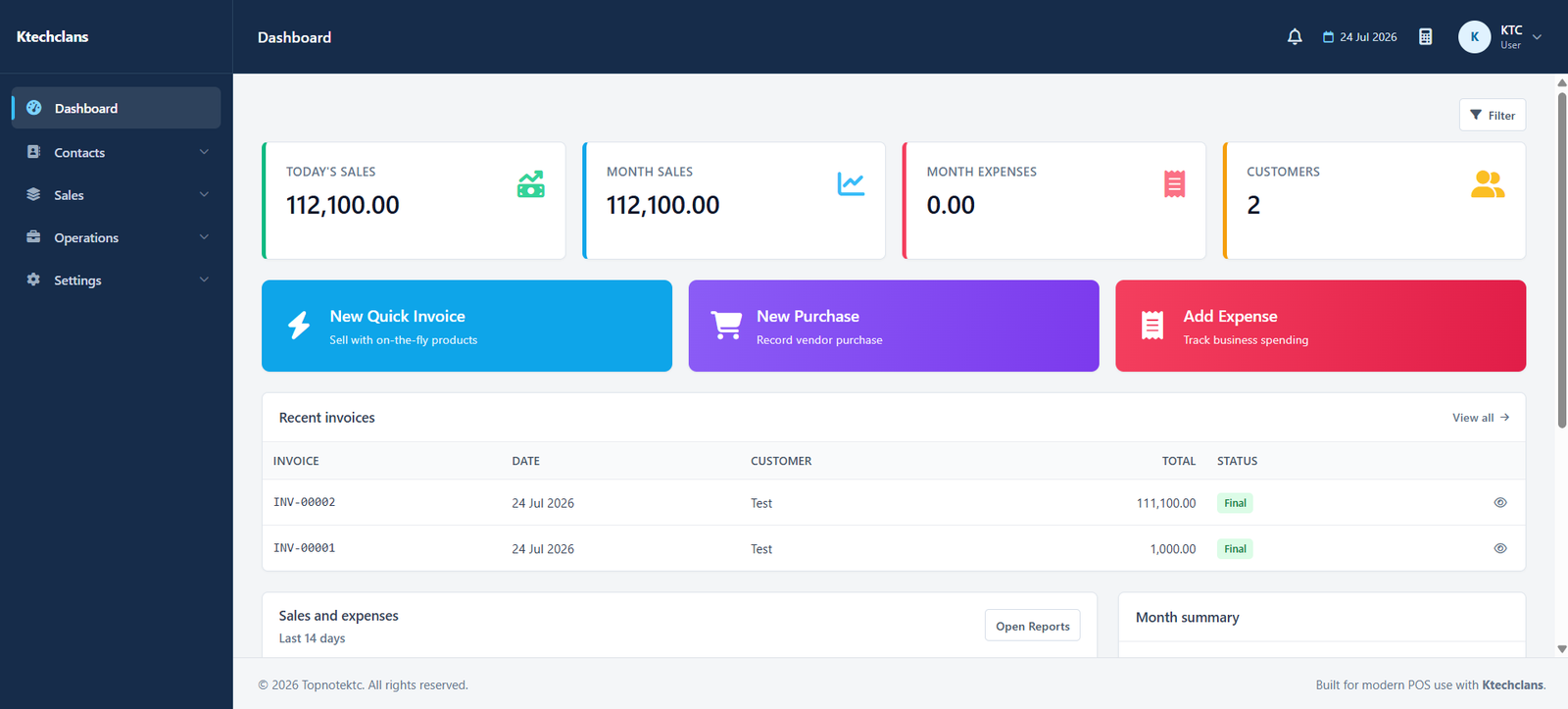
Move over the screen to see it clearly.Tap anywhere on the screen to see it clearly.
Trusted by businesses that run on TopNote















These are the screens your staff will use every day. All of them are included in Essential.
Scan, search, discount, hold a sale, and take cash, card or both.
Products with barcode, SKU and unit. Stock moves with every sale and purchase.
From quotation to tax invoice with a QR code, without typing it twice.
Journals, ledger, cash and bank books, trial balance and a tax report.
Every sale and purchase updates inventory, so the screen always matches the shelf.
| Product | In stock | Status |
|---|---|---|
| House blend coffee | 48 | In stock |
| Green tea | 36 | In stock |
| Rolled oats | 8 | Low stock |
Quotation, tax invoice and payment. One record, start to finish.
Scan, discount, split cash and card, and print the receipt in a few taps.
Every sale posts to your books, so profit, expenses and VAT are always current.
Twelve modules, one database. A sale made at the counter is already an invoice, a ledger entry and a line in the report.
Scanned, discounted and paid at the counter.
Inventory drops the moment the item leaves.
A tax invoice with QR code, in Arabic, English or both.
The entry posts to your accounts by itself.
Switch the whole workspace between both languages, and print every document in either one, or both.
| Item | Qty | Amount |
|---|---|---|
| House blend coffee | 1 | 145.00 |
| Green tea | 2 | 120.00 |
| Rolled oats | 1 | 170.00 |
| VAT 15% | 65.25 |
Built for the way you sell, manage stock and keep your books.
Ring up sales fast, keep shelves counted, and close the day with every number already in the report.
Keep long queues moving with barcode scanning, quick search and split payments across thousands of items.
Take orders at the counter, hold a bill until the table is ready, and keep ingredient costs beside your sales.
Find products by name or barcode, issue a tax invoice with every sale, and keep supplier bills and stock in order.
Sell in bulk with quotations and invoices, sell on credit, and see who owes you at a glance.
Sell devices and accessories, add custom columns such as IMEI or warranty to the invoice, and take deposits on orders.
Sell sizes and colours as their own items, handle exchanges with credit notes, and see which lines sell best.
Quote the job, invoice when it is agreed, record advances, and follow up on what each customer still owes.
Record raw material purchases and running costs, sell finished goods on invoice, and see profit by period.
Buy, sell on invoice and keep the books straight with journals, ledger, cash book, bank book and trial balance.
We do the setup. You keep selling.
Sign up online and choose the package that matches your size. It runs in the browser, so there is nothing to install.
Our team loads your products, tax rates and invoice layout, then walks your staff through the screens. This is free.
Use the counter screen for sales, send invoices to customers, and check the daily report before you close.
Start with Essential. Move to Advanced when you add stock control, barcodes or a second branch. The screens stay familiar.
A focused POS and invoicing package for small businesses that need fast, compliant daily operations.
Choose from live Advanced POS packages. Every plan shows its current price and enabled modules directly from the Advanced platform.
Prices shown for your region. Confirm the final price, taxes and included modules at checkout.
The things people ask before they start. For anything else, the full FAQ and our team are a click away.
Point of sale, invoices, quotations, delivery notes, sale returns, purchases, expenses, customers, vendors, payments and customer advances, plus accounting with journals, ledger, cash book, bank book, trial balance and a tax report. Every document updates the same set of figures.
Most businesses start the same day. Send us your product list and our team loads it, sets your tax rates and invoice template, and walks your staff through the screens, free of charge.
Not at all. TopNote is designed for busy business owners, not IT experts. If you can use a smartphone, you can use TopNote. And our local support team is always one message away.
Essential covers the point of sale, invoicing, purchases, expenses, payments, accounting and reports for one location. Advanced adds inventory control, barcodes, stock transfers, multiple locations and retail and restaurant operations.
Yes. TopNote runs in the browser, so it works on any laptop, tablet or phone with nothing to install. Staff can sell from a tablet at the counter while you check the day's report from your phone.
Book a demo and we will ring up a sale, issue the invoice and open the report using your item list, in Arabic or English.
Select your TopNote product to continue to the correct login.